Waypointly
Waypointly is a fork of [Waypoint Manager](https://www.curseforge.com/hytale/mods/waypoint-manager) updated for the latest version of hytale
A waypoint management system for Hytale with an in-game UI.


Features
- UI-based waypoint manager - Create, edit, and remove waypoints through a graphical interface
- Warping - Warp from the waypoint list or straight from the map screen, with optional cooldown and warmup
- Shared waypoints - Publish a waypoint to the whole world so every player sees it
- Per-waypoint tint - Recolor any icon with a hex tint
- Configurable icon set - Every icon comes from config, so packs can add their own
- Distance display - Horizontal distance in blocks from your position to each waypoint
- Sorting and search - Order by distance or name, filter by name
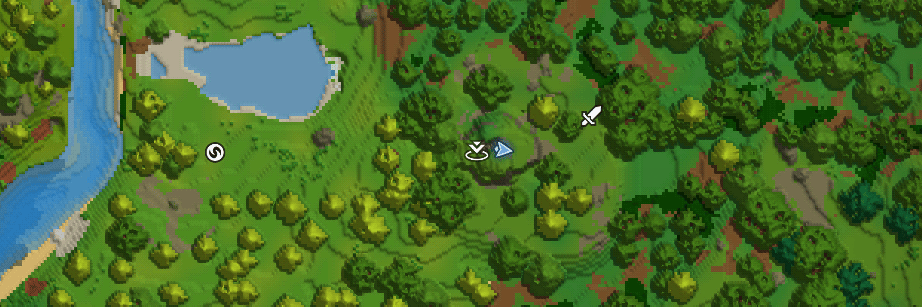
- Map markers - Waypoints appear on your in-game map
Usage

Use /waypoint or /wp to open the waypoint manager.

Each waypoint row shows three buttons:
- WARP (green) - Warp to the waypoint
- EDIT (blue) - Change its name, position, icon or tint
- REMOVE (red) - Delete it
Creating and editing
The add and edit forms take a name, an X and Z coordinate, an icon and an optional tint. If you are allowed to publish shared waypoints, a PERSONAL / SHARED toggle appears next to the tint field. Visibility is fixed once a waypoint exists, so pick it when you create it.
Warping from the map screen
Right-click one of your waypoints on the map and pick Warp from its context menu. This entry only appears for players who are allowed to warp.

The map screen also has its own built-in "teleport to marker" button. That one is engine-controlled and stays Creative-only no matter what you configure here. Waypointly's Warp entry works in Adventure too.
Vertical position
Hytale stores map markers with an X and a Z only, so a waypoint has no saved Y. Warping resolves the landing height from the terrain at the target column, the same way the vanilla map's own marker teleport does. A waypoint over a cave or an upper floor lands on the surface above it.
Commands
| Command | Description |
|---|---|
/waypoint, /wp | Open the waypoint UI |
/waypoint add <name> | Add a waypoint at your position |
/waypoint remove <name> | Remove a waypoint by name |
/warp <name> | Warp to a waypoint by name, or by marker id |
| `/waypoint perms grant <player> <ui\ | teleport\ |
| `/waypoint perms revoke <player> <ui\ | teleport\ |
/waypoint perms list <player> | Show which Waypointly permissions a player has |
/listmarkers | List your waypoints in chat |
/resetmarkers | Delete all of your personal waypoints in this world |
Both the player and the permission argument on /waypoint perms tab-complete.
Permissions
| Node | Default | Grants |
|---|---|---|
riprod.waypoints.command.waypoint | everyone | Access to the /waypoint UI |
riprod.waypoints.command.teleport | WorldEditor and above | The WARP button, the map Warp entry, and /warp |
riprod.waypoints.command.shared | Builder and above | Publishing shared waypoints |
riprod.waypoints.command.admin | ServerEditor and above | Managing permissions, editing anyone's shared waypoints |
Groups inherit from each other (Adventurer → Builder → WorldEditor → ServerEditor → Admin), so a node granted to Builder is also held by everyone above it.
Granting permissions
The engine's own /perm user add takes a raw UUID. Waypointly's perms subcommand takes a player name with tab-completion instead, so you never have to look a UUID up:
/waypoint perms grant Riprod teleport
/waypoint perms revoke Riprod ui
/waypoint perms list Riprod
The player has to be online for their name to resolve. For offline players, or to change a whole group, use the engine's /perm commands.
On singleplayer, /op self grants everything.
To hand warping to everyone regardless of permissions, set AllowTeleportForEveryone to true in the config rather than granting the node to each player.
Configuration

Waypointly uses Configly, which is bundled inside the jar - there is nothing extra to install. The config lives at Server/Configs/Waypointly.json.
Editing the config
Config changes are made in the asset editor, not by hand-editing a file in your saves folder:
- Open the asset editor and find
Server/Configs/Waypointly.json. - Change whatever you want. Every field is a typed control with inline documentation, because Configly
registers the config's codec with the editor rather than handing it a raw JSON blob.
- Hit Override asset and save it into a custom pack.
Overriding writes your edited copy into your own pack, so your settings survive mod updates instead of being replaced by the shipped defaults.
Options
| Key | Default | Meaning |
|---|---|---|
MaxWaypoints | -1 | Personal waypoints per player per world. -1 is unlimited. |
MaxSharedWaypoints | -1 | Shared waypoints one player may contribute per world. -1 is unlimited. |
MaxNameLength | 24 | Longest accepted waypoint name. |
AllowTeleportForEveryone | false | Give every player warping regardless of permissions. |
AllowSharedWaypoints | true | Whether shared waypoints can be created at all. |
TeleportCooldownSeconds | 0 | Seconds between warps. 0 disables it. |
TeleportWarmupSeconds | 0 | Delay between requesting a warp and being moved. 0 warps instantly. |
Icons | 11 built-ins | Every icon offered in the picker. The first entry is the default for new waypoints. |
Custom icons
Icons is a list of Name (the picker label) and Image (the marker texture). Image is a validated image field in the asset editor, restricted to Common/UI/WorldMap/MapMarkers - the same folder the client resolves map marker images from, so a single entry covers both the picker swatch and the marker on the map.
"Icons": [
  { "Name": "Coordinate", "Image": "UI/WorldMap/MapMarkers/Coordinate.png" },
  { "Name": "My Guild", "Image": "UI/WorldMap/MapMarkers/GuildBanner.png" }
]
To add your own, drop the .png into Common/UI/WorldMap/MapMarkers in your pack and pick it in the editor - no rebuild needed. The editor rejects a path outside that folder, a non-.png file, or a file that does not exist, so a typo is caught when you save rather than showing up as a blank icon in game.
Waypointly ships no marker images of its own; the 11 defaults are Hytale's own map marker set.
TODO
- Translations
Questions or suggestions? Feel free to drop a comment below!
0 Comments