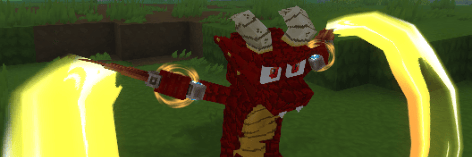
Pastel's Kobolds
ArtA Kobold Themed Player Model, NPC, and Hopefully soon Pet Mod
Now with Wardrobe Compatibility
A Kobold Player Model, Kobold NPCs, and Kobold Pets!!!
As of 1.2.2 you can now Customize your Kobold in the Wardrobe Menu! Select if you'd like to use one of the Original Kobolds or the two new Fully Gradient Kobolds. The two Gradient Kobolds will allow you to select any color from the List. Next, equip your eyes and select your eye color! The Teeth, your Horns, Eyebrows, and the Tail Ridges are now found throughout the Wardrobe menu. Allowing further color customizations, or the choice not to wear them at all.
As of 1.2.0 This mod not only Includes the Kobold Player Models for you to Enjoy. But now, even if you opt not to use the Model, you can still expereince the Joy of Kobolds! In the Caves of Zone 3 and the Jungle of Zone 4 you can find these Kobolds roaming about. If you approach them they'll offer to trade their ores in exchange for yours.
Currently, due to limitations, each Kobold Color shares a Merchant Table. Each Tables is randomized at 6pm in game and the trades are refilled. Trades can either be going up or down a tier in ore.
It costs 10 ore for 1 ore of the higher tier, and 1 ore nets you 3 of the lower. ie, 10 copper will get you 1 iron. And 1 iron can get you 3 copper. This is to ensure it isn't broken or too powerful. While still giving them something useful to offer the player. Feedback on the trade values is appreciated.
Additionally. If you happen to be so inclined to harm these Kobolds. There is a chance they will drop 1 of 4 eggs. Each Kobold can drop any of the eggs, and each egg has a 2.5% chance to drop. It might seem low, but remember there are 4 and I didn't want to risk spamming anyone with a bunch of Pet Eggs.
Left click the egg and Voila you have a Kobold Pet that follows you around. Currently, all they do is follow you. I'd like for them to be able to mine ores in your stead. I have zero idea how to impliment that and if anyone has any tips, suggestions, or just wants to help. I would gladly take it. Thank you.
Usage
The best way to use the Models or attachments within this mod is with the Wardrobe mod. This mod contains compatability with Wardrobe. Allowing you to access the mirror to change your model while retaining most of your default attachments. You can swap attachments providing in this pack or other packs that have compatibility with Wardrobe.
Alternatively you can use the op self method. /op self
And then you can set the model using /model set PurpleBold There are currently four model options. PurpleBold, GreenBold, YellowBold, and RedBold
You can set the model for another player by adding their name after
/model set [player]
I recommend using Persistent Model Assignment if you use the model set method. PMA allows the server to remember what model is applied to a Player when loading the world up.
Player Model Changer is another great alternative. It allows you to swap models without needing to op anyone. This still requires a command that can be done by any player. /pmod By default the Kobolds will appear in the list. Currently PMC does not have persistance, however the mod maker has stated that are looking into adding it.
Armor and Attachments
Armor is hit or miss on this model. Some chest armor is fine, gloves all look great, a few helmets are okayish, and none of the boots work. Armor can now be hidden in game using a toggle next to the armor piece and a mod is no longer required.
Attachments are equally hit or miss. Capes, arm accessories, and similar work in full. Various other face ones may or may not work. You can equip Attachments in the asset editor.
With the addition of Wardrobe. Any default accessories you're wearing, save for those in areas that will cause a conflict, will show when you change using the Mirror. You can click the upper right eye icon to disable the default cosmetics and only wear those available in the mirror if you so choose.
Creating your Own Texture
For anyone that wants to create their own texture, I tried my absolute best to make sure the uv map wasn't terrible. I've never done Model work or texturing, so I did what made sense, and often referred to the other models for best placements. Still there's a good chance it's not the most optimal placement. Please forgive me for this.
Once you've created your own texture you can replace one of the existing textures, ensure the name matches. Or you can use the asset editor to swap out the texture manually if you prefer.
Thank you for taking the time to look over my Model, and if you end up using this Model. Please Enjoy. In either case. This was made for my own personal usage, but given the nature of the game. If others can find use and enjoyment out of this Model that would be awesome.
Version 1.2.0
As of v1.2.0 Kobold NPC's now spawn in the world. Find them in the Caves of Zone 3 and Jungle of Zone 4. They offer trades! Use them to trade your ores up or down a tier. Kobolds have a chance of dropping a pet egg when killed. Giving you a chance to have your own tamed Kobold. Current the Kobold Pets do not offer anything, and are only capable of Following you. I'm hoping for a Library at some point to give them more functionality.
Version 1.2.1
As of v1.2.1 the Mod is not Compatable with Wardrobe. Use Wardrobe to change your model without commands. Or to change the Cosmetics, including the two from this packs, without fuss. Allowing you to take off the tailring or goggles off the models they start on, or easily put them on others.
Memories have also been added. It is now possible to collect the 4 Kobold colors as memories. The Pet Variants do not count towards Memories.
Version 1.2.2
A lot of Compatability with Wardrobe has been added. As of 1.2.2 you'll find two additional Kobolds in the Wardrobe menu, both using a Gradient Texture for you to select colors. The various parts of the Kobold are found in other menus, allowing you to select them at your desire and Make your own Kobold. The Original Kobolds have had some work done on them to keep their Model file structure in line with the Attachments. You'll find the Original Horns and a Horn with a Gold Ring on it in the Horns Menu under head. Additionally 3 new horns have been added. These come courtesy of Violets Wardrobe and their Custom License. If you use either the original mod or the Wardrobe API you'll even be able to have multiple horns. Seen the Patch Notes in the files for additional details on all of the changes.
0 Comments