OMNISIGHT – WAILA and The One Probe style HUD Overlay
PluginOmnisight is a comprehensive in-game inspection HUD that reveals detailed block, item, entity, crop, machine, and world data instantly on hover. Including time, biome, weather, coordinates, and more.
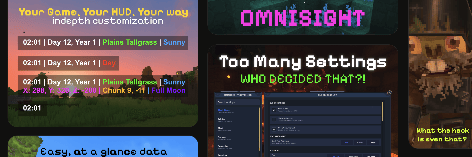
<p><img style="width: 100%;" src="https://i.ibb.co/mFCWfxmk/hero-top-section.png" alt="Omnisight HUD Overview"></p> <p><img style="width: 100%;" src="https://i.ibb.co/Gfm1j2KG/banner-hero.png" alt="Omnisight Showcase"></p> <p><img style="width: 100%;" src="https://i.ibb.co/Rp2D8HVV/banner-second.png" alt="Omnisight Features"></p> <p style="text-align: left;"><strong>Omnisight</strong> is an advanced, fully customizable HUD overlay mod that displays detailed real-time information about your world including time, weather, biome, coordinates, blocks, items, entities, equipment stats, crops, arrows, and more.</p> <p style="text-align: left;">Designed to be powerful yet flexible, Omnisight lets you see exactly what you need, where you need it, without cluttering your screen in real time.</p> <p><code style="font-family: var(--font-mono); text-align: left; line-height: 1.5;">This mod is compatible with <a href="https://www.curseforge.com/hytale/mods/multiplehud" target="blank" rel="nofollow noopener">MultipleHUD</a>! If you encounter any crashes while using mods together, please report them and I'll work on a fix right away.</code></p> <hr> <h2 style="text-align: left;">Commands</h2> <p><code>/omni settings</code> or <code>/omni config</code> – Open the Omnisight settings UI</p> <p><code>/omni on</code> / <code>/omni off</code> – Enable or disable the HUD</p> <hr> <h2 style="text-align: left;">Server Configuration</h2> <p>Omnisight supports server-side configuration, allowing server owners to define:</p> <ul> <li>Allowed HUD elements</li> <li>Visibility rules per world or server</li> <li>Balanced or restricted information for multiplayer environments</li> </ul> <p><em>More server-side options can be found here - <a href="https://www.notion.so/OmniSight-Configuration-Guide-2edfc36a30588003b94dd4eba4839f8c?source=copylink" target="_blank" rel="nofollow noopener">documentation</a></em></p> <hr> <h2 style="text-align: left;">Installation (Windows)</h2> <p style="text-align: left;"><strong>1. Install the mod</strong><br>Place the <code>.jar</code> file into your Mods folder:</p> <pre><code>%APPDATA%\Hytale\UserData\Mods</code></pre> <p style="text-align: left;"><strong>2. Enable the mod</strong><br>Main Menu → Worlds → Right-click your world → Enable Mods → Select <strong>Omnisight</strong> → Save World Settings</p> <p style="text-align: left;"><strong>3. Join the world</strong><br>Use <code>/omni settings</code> or <code>/omni on</code> to activate and configure the HUD.</p> <hr> <p style="text-align: left;">Found a bug, have feedback, or want to suggest a feature? Feel free to report it. Omnisight is actively developed and improved.</p>
0 Comments