
MCP (Model Context Protocol) - Connect AI assistants (Claude, Gemini, ChatGPT, ...)
PluginHytale MCP brings the power of AI assistants to your Hytale server through the Model Context Protocol (MCP). This plugin enables AI models like Claude, ChatGPT, and Gemini to interact with your server, allowing for automation, creative building
Hytale MCP
Model Context Protocol plugin for Hytale servers
Connect AI assistants like OpenCode, Claude, ChatGPT, and Gemini directly to your Hytale server
   
Features • Installation • Configuration • Usage • API • Contributing
DEMO: https://www.youtube.com/watch?v=89IBkjXR-Yk
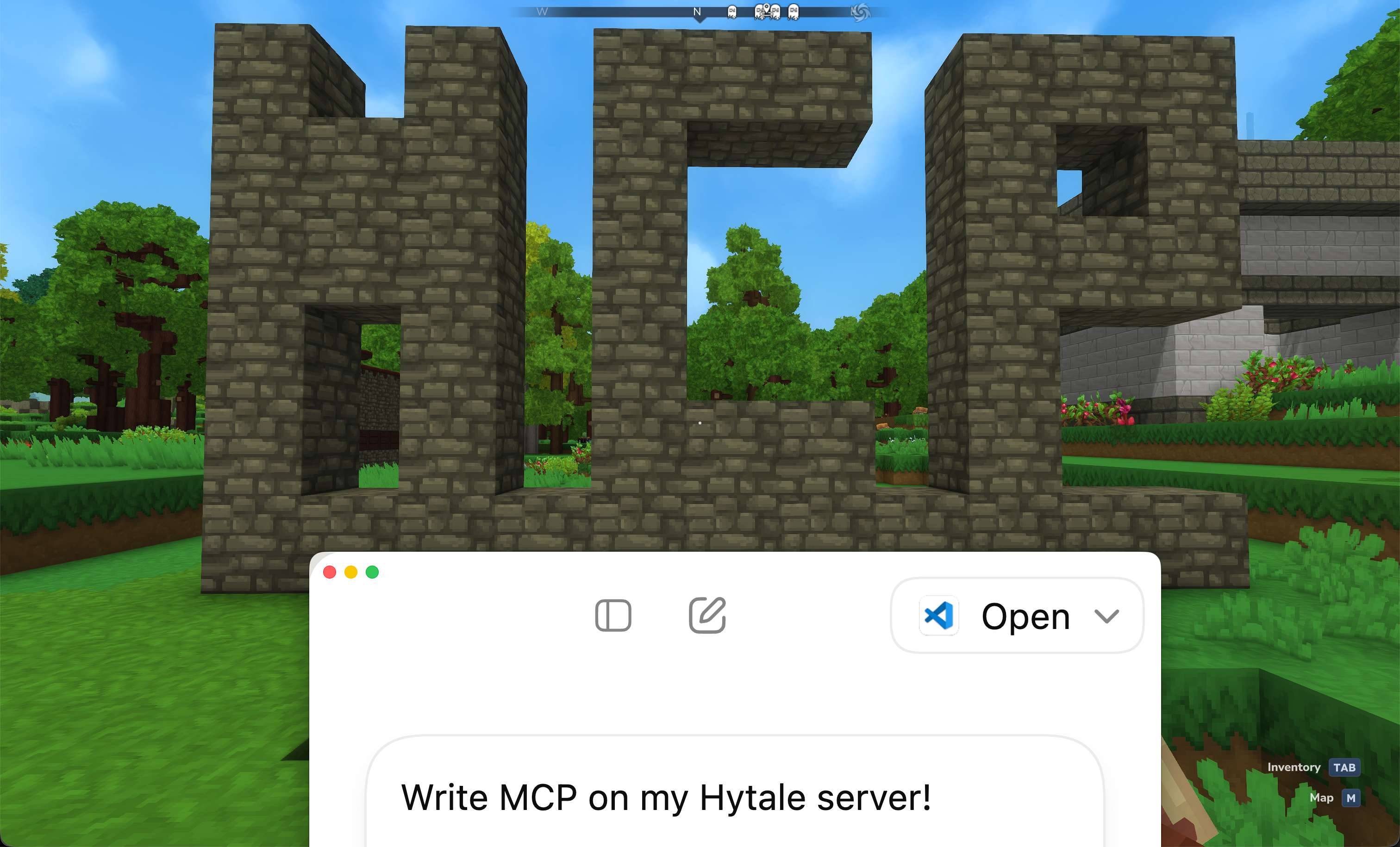
Table of Contents
- About
- Features
- Requirements
- Installation
- Configuration
- Usage
- API Reference
- Extending
- Best Practices
- Troubleshooting
- FAQ
- Building
- Contributing
- License
- Support
About
Hytale MCP brings the power of AI assistants to your Hytale server through the Model Context Protocol (MCP). This plugin enables AI models like Claude, ChatGPT, and Gemini to interact with your server, allowing for automation, creative building, and enhanced server management.
Use Cases
- Creative Building - Tell AI to "build a Eiffel Tower at my location" and watch it construct complex structures
- Server Automation - Automate routine tasks like player management
- Administrative Tools - Manage your server with natural language commands
- Development & Testing - Rapidly prototype and test game mechanics
Whether you're a server administrator, builder, or developer, Hytale MCP provides a secure and extensible foundation for AI integration.
Features
Core Capabilities
- Full MCP Protocol Support - Standards-compliant Model Context Protocol implementation
- Secure Authentication - Token-based auth with separate admin and player permissions
- Extensible Architecture - Easy-to-use plugin system for adding custom features
- Granular Permissions - Fine-grained access control for different user levels
- AI Client Compatible - Works with OpenCode, Claude, ChatGPT, Gemini, and any MCP-compatible client
Built-in Tools
- World Building - Construct anything with natural language prompts using batch block placement
- Terrain Editing - Flatten rectangular areas for building foundations
- Item Management - Give items to players with smart item search
- Block Discovery - Search and categorize all available blocks
- Player Management - List players, get positions, manage inventories, send messages
- Server Administration - Execute commands, broadcast messages, kick players
- Information Retrieval - Access server stats, world info, block types, and player data
- Log Management - Filter and retrieve server logs by level, date, and line count
Requirements
Installation
Quick Start
- Download the latest
MCP-1.*.*.jarfrom the releases page - Install the Nitrado WebServer plugin (required dependency)
- Place both JAR files in your server's
mods/directory - Start your server to generate the default configuration
- Configure your tokens and permissions (see Configuration)
- Restart your server
The plugin will be available at http://your-server:port/Top-Games/MCP/mcp
Quick Example
Once installed, you can test the connection:
# Test basic connectivity
curl http://localhost:port/Top-Games/MCP/mcp

# List available tools (with authentication)
curl -X POST http://localhost:port/Top-Games/MCP/mcp \
  -H "Authorization: Bearer your-admin-token" \
  -H "Content-Type: application/json" \
  -d '{
    "jsonrpc": "2.0",
    "method": "tools/list",
    "id": 1
  }'
Configuration
After the first run, a configuration file will be created at mods/MCP/config.json:
Note: The server port is configured in the WebServer plugin settings, not here.
{
  "auth": {
    "enabled": true,
    "adminTokens": [
      "your-admin-token-here"
    ],
    "playerTokens": [
      "your-player-token-here"
    ]
  },
  "features": {
    "players": {
      "listPlayers": false,
      "executeCommand": false,
      "broadcastMessage": false,
      "setBlock": false,
      "getPlayerPosition": false,
      "getLogs": false,
      "sendChatMessage": false,
      "getBlockTypes": false,
      "listBlocks": false,
      "getWorldInfo": false,
      "getServerInfo": false
    },
    "admins": {
      "listPlayers": true,
      "executeCommand": true,
      "broadcastMessage": true,
      "setBlock": true,
      "getPlayerPosition": true,
      "getLogs": true,
      "sendChatMessage": true,
      "getBlockTypes": true,
      "listBlocks": true,
      "getWorldInfo": true,
      "getServerInfo": true
    },
    "maxBlocksBatch": 1000
  }
}
Configuration Reference
#### Server Settings
#### Authentication Settings
| Option | Type | Description |
|---|---|---|
| <code>auth.enabled</code> | boolean | Enable/disable token authentication |
| <code>auth.adminTokens</code> | string[] | Tokens with full administrative access |
| <code>auth.playerTokens</code> | string[] | Tokens with limited player-level access |
#### Feature Permissions
Configure feature availability for each permission level:
| Permission | Description | Tools Using This Permission |
|---|---|---|
| <code>listPlayers</code> | List all connected players | <code>list_players</code> |
| <code>getServerInfo</code> | Get server information and status | <code>getserverinfo</code> |
| <code>executeCommand</code> | Execute server commands | <code>executecommand</code>, <code>giveitem</code> |
| <code>broadcastMessage</code> | Send messages to all players | <code>broadcast_message</code> |
| <code>getLogs</code> | Retrieve and filter server logs | <code>get_logs</code> |
| <code>setBlock</code> | Place blocks at coordinates | <code>setblock</code>, <code>setblocksbatch</code>, <code>flattenterrain</code> |
| <code>getBlockTypes</code> | Get list of available block types | <code>getblocktypes</code>, <code>getbuildingguide</code> |
| <code>listBlocks</code> | Search and filter blocks with categorization | <code>list_blocks</code> |
| <code>getPlayerPosition</code> | Get player position, rotation, and world | <code>getplayerposition</code> |
| <code>getWorldInfo</code> | Get world information and properties | <code>getworldinfo</code> |
| <code>sendChatMessage</code> | Send chat message to specific player | <code>sendchatmessage</code> |
Additional Settings:
- `maxBlocksBatch` (int, default: 1000) - Maximum blocks per
set_blocks_batchcall
Permission Structure:
- `features.admins` - Features available to admin token holders
- `features.players` - Features available to player token holders
Disabling HTTPS (HTTP Connection)
By default, the Nitrado WebServer plugin uses HTTPS. If you need to connect via HTTP, you can disable TLS in the WebServer plugin configuration.
Location: mods/Nitrado_WebServer/config.json
Add or modify the Tls section:
{
  "Tls": {
    "Insecure": true
  }
}
Usage
Connecting AI Clients
To connect an AI assistant to your Hytale server:
- Configure your AI client to connect to your MCP endpoint
- Provide the endpoint URL:
http://your-server:port/Top-Games/MCP/mcp - Authenticate using a Bearer token in the request header:
Authorization: Bearer your-token-hereExample Client Setup
For OpenCode or other MCP clients, add this configuration:
{
  "mcpServers": {
    "hytale-mcp": {
      "url": "http://your-server:port/Top-Games/MCP/mcp",
      "headers": {
        "Authorization": "Bearer your-admin-token"
      }
    }
  }
}
API Reference
Available Tools
#### set_block
Places a single block at specified coordinates.
Example Prompt:
"Place a sandstone brick at coordinates x:10, y:64, z:10"
Parameters:
x(int): X coordinatey(int): Y coordinatez(int): Z coordinateblockType(string): Block identifier (e.g.,Rock_Sandstone_Brick)world(string): World name
Example Response:
{
  "success": true,
  "message": "Block placed successfully",
  "x": 10,
  "y": 64,
  "z": 10,
  "world": "world",
  "blockType": "Rock_Sandstone_Brick"
}
#### list_players
Lists all currently connected players on the server.
Example Prompt:
"Who is currently online on the server?" "List all connected players"
Response:
{
  "count": 5,
  "players": [
    {
      "uuid": "player-uuid",
      "name": "PlayerName"
    }
  ]
}
#### get_server_info
Gets information about the server including name, version, and uptime.
Example Prompt:
"What's the server status?" "Show me server information and uptime"
Response:
{
  "name": "My Hytale Server",
  "version": "1.0.0",
  "uptime": "2 days, 5 hours, 30 minutes",
  "tps": 20.0
}
#### list_blocks
Lists all available blocks with smart categorization and caching. Perfect for discovering item IDs for building or giving items.
Example Prompt:
"Show me all stone blocks" "Find building blocks that contain 'brick'" "List 20 decoration blocks"
Parameters:
limit(int, optional): Maximum number of blocks to returnsearch(string, optional): Search term to filter blocks by name (case-insensitive)category(string, optional): Filter by category (building, decoration, nature, ore, stone, wood, metal, glass, food, tool, weapon, misc)
Example Request - Search for stones:
{
  "search": "stone",
  "limit": 10
}
Example Request - Get all building blocks:
{
  "category": "building",
  "limit": 50
}
Response:
{
  "total": 1234,
  "returned": 10,
  "blocks": [
    {
      "name": "hytale:stone_brick",
      "id": 42,
      "category": "building"
    },
    {
      "name": "hytale:sandstone",
      "id": 87,
      "category": "stone"
    }
  ],
  "categoryStats": {
    "building": 250,
    "stone": 180,
    "wood": 120,
    "nature": 300,
    "decoration": 95,
    "misc": 289
  },
  "searchTerm": "stone"
}
#### give_item
Gives an item to a player using the /give command.
Example Prompt:
"Give Michel 10 sticks" "Give 64 stone bricks to PlayerName"
Parameters:
player(string): Player name to give the item toitemId(string): Item ID (uselist_blocksto find IDs)quantity(int, optional): Quantity to give (default: 1)
Example Request:
{
  "player": "Michel",
  "itemId": "Ingredient_Stick",
  "quantity": 10
}
Response:
{
  "player": "Michel",
  "itemId": "Ingredient_Stick",
  "quantity": 10,
  "command": "give Michel Ingredient_Stick --quantity=10",
  "status": "executed"
}
#### flatten_terrain
Flattens a rectangular terrain area at a specific height, perfect for building foundations. Fills below with blocks and clears above with air.
Example Prompt:
"Flatten a 50x50 area at my location for building a castle" "Create a stone platform 100 blocks wide at height 64" "Prepare the terrain for a large building, make it flat"
Parameters:
world(string): World UUIDx1,z1(int): First corner coordinatesx2,z2(int): Second corner coordinatesy(int): Height level to flatten atfillBlock(string, optional): Block type to fill below surface (default: "hytale:dirt")maxHeight(int, optional): Maximum height to clear above (default: y+10)
Example Request - Create a 50x50 stone platform:
{
  "world": "world-uuid-here",
  "x1": 100,
  "z1": 100,
  "x2": 150,
  "z2": 150,
  "y": 64,
  "fillBlock": "hytale:stone"
}
Response:
{
  "area": 2601,
  "minX": 100,
  "maxX": 150,
  "minZ": 100,
  "maxZ": 150,
  "flattenY": 64,
  "maxHeight": 74,
  "fillBlock": "hytale:stone",
  "blocksPlaced": 166464,
  "blocksCleared": 26010,
  "totalBlocks": 192474,
  "durationMs": 1250,
  "status": "success"
}
#### execute_command
Executes a server command.
Example Prompt:
"Make Michel an operator" "Execute the command 'weather clear'" "Set the time to day"
Parameters:
{
  "command": "op Michel"
}
Response:
{
  "command": "op Michel",
  "status": "executed"
}
#### broadcast_message
Broadcasts a message to all connected players.
Example Prompt:
"Announce to everyone that the server will restart in 5 minutes" "Broadcast a welcome message to all players"
Parameters:
{
  "message": "Welcome to our server!"
}
Response:
{
  "message": "Welcome to our server!",
  "status": "broadcasted"
}
#### get_logs
Retrieves server logs with optional filtering.
Example Prompt:
"Show me the last 50 error logs" "Get server logs from yesterday" "What are the recent warnings in the logs?"
Parameters:
lines(int, optional): Number of lines to retrieve (default: 100, max: 1000)level(string, optional): Filter by log level (e.g., "INFO", "WARNING", "ERROR", "SEVERE")date(string, optional): Log file date in format "YYYY-MM-DD"
Example Request:
{
  "lines": 50,
  "level": "ERROR"
}
Response:
{
  "lineCount": 50,
  "level": "ERROR",
  "content": "[2026-02-01 10:30:45] [ERROR] Failed to connect to database\n[2026-02-01 10:30:45 [ERROR] Connection timeout\n...",
  "timestamp": "2026-02-01T10:32:00"
}
Example Request for specific date:
{
  "date": "2024-01-14",
  "lines": 200
}
#### set_blocks_batch
Sets multiple blocks at specified world coordinates in a single request (configurable limit, default: 1000 blocks).
Example Prompt:
"Build a 10x10 stone wall at my location" "Create a house at coordinates x:100, y:64, z:200" "Build an Eiffel Tower replica at my position" "Construct a small castle near me"
Parameters:
blocks(array): Array of block objects, each with x, y, z, blockTypex(int): X coordinatey(int): Y coordinatez(int): Z coordinateblockType(string): Block identifier (e.g.,Rock_Sandstone_Brick)world(string): World name (optional, defaults to current world)
Request Example:
{
  "blocks": [
    {"x": 10, "y": 64, "z": 10, "blockType": "Rock_Sandstone_Brick"},
    {"x": 11, "y": 64, "z": 10, "blockType": "Rock_Sandstone_Brick"},
    {"x": 10, "y": 64, "z": 11, "blockType": "Rock_Sandstone_Brick"}
  ]
}
Response:
{
  "total": 3,
  "success": 3,
  "failed": 0,
  "results": [
    {"x": 10, "y": 64, "z": 10, "blockType": "Rock_Sandstone_Brick", "status": "success"},
    {"x": 11, "y": 64, "z": 10, "blockType": "Rock_Sandstone_Brick", "status": "success"},
    {"x": 10, "y": 64, "z": 11, "blockType": "Rock_Sandstone_Brick", "status": "success"}
  ]
}
#### get_player_position
Gets the current position (x, y, z) and rotation (yaw, pitch) of a specific player.
Example Prompt:
"Where is Michel located?" "Get my current position" "What are the coordinates of PlayerName?"
Parameters:
player(string): Player name
Request:
{
  "player": "Michel"
}
Response:
{
  "name": "Michel",
  "uuid": "xxxxx-xxxxx-xxxxx-xxxxx-xxxxx",
  "position": {
    "x": 1943.18,
    "y": 124.0,
    "z": 603.64,
    "yaw": -1.91,
    "pitch": 0.0,
    "worldUuid": "xxxxx-xxxxx-xxxxx-xxxxx-xxxxx"
  }
}
#### get_world_info
Gets information about a world including name, seed, and dimension.
Example Prompt:
"What's the world seed?" "Show me information about the current world" "Where is the spawn point?"
Response:
{
  "name": "My World",
  "seed": 123456789,
  "dimension": "overworld",
  "spawn": {
    "x": 0,
    "y": 100,
    "z": 0
  }
}
#### send_chat_message
Sends a chat message to a specific player.
Example Prompt:
"Send Michel a welcome message" "Tell PlayerName that their building looks great" "Message the admin about the issue"
Parameters:
player(string): Target player namemessage(string): Message to send
Request:
{
  "player": "Michel",
  "message": "Welcome to the server!"
}
Response:
{
  "message": "Welcome to the server!",
  "status": "sent"
}
MCP Protocol Endpoints
The plugin implements standard MCP JSON-RPC 2.0 endpoints:
#### POST /mcp
Main endpoint for MCP tool operations.
Available Methods:
initialize- Initialize MCP connection and negotiate capabilitiestools/list- List available tools based on authentication leveltools/call- Execute a tool with specified parametersping- Health check endpoint
Example Request:
{
  "jsonrpc": "2.0",
  "method": "tools/list",
  "params": {},
  "id": 1
}
#### GET /mcp
Returns plugin metadata and version information.
Example Response:
{
  "name": "MCP",
  "version": "1.0.0",
  "protocol": "mcp",
  "description": "Model Context Protocol for Hytale servers"
}
Extending with Custom Features
Creating a custom feature is simple (with another plugin by example). Implement the McpFeature interface:
public class MyCustomFeature implements McpFeature {
    private final HytaleLogger logger;

    public MyCustomFeature(HytaleLogger logger) {
        this.logger = logger;
    }

    @Override
    public String getName() {
        return "my_custom_feature";
    }

    @Override
    public McpTool getToolDefinition() {
        return new McpTool(
            "my_custom_feature",
            "Description of what this feature does",
            "function"
        );
    }

    @Override
    public McpToolResponse execute(McpToolCall call, McpAuthManager.AuthLevel authLevel) {
        try {
            // Your custom logic here

            JsonObject result = new JsonObject();
            result.addProperty("data", "your result");

            return McpToolResponse.success(GSON.toJson(result));
        } catch (Exception e) {
            logger.atSevere().withCause(e).log("Error in custom feature");
            return McpToolResponse.error("Failed: " + e.getMessage());
        }
    }

    @Override
    public boolean hasPermission(McpAuthManager.AuthLevel authLevel, McpConfig config) {
        // Define who can use this feature
        return authLevel == McpAuthManager.AuthLevel.ADMIN;
    }
}
Then register it in your plugin's registerFeatures() method:
featureRegistry.registerFeature(new MyCustomFeature(logger));Best Practices
- Strong Tokens - Generate cryptographically secure random tokens (32+ characters)
  # Example token generation
openssl rand -base64 32- Minimal Permissions - Only enable features that users actually need
- Restrict
executeCommandto admin tokens only - Disable player features if not required
FAQ
General Questions
Q: What is the Model Context Protocol (MCP)? A: MCP is an open standard that enables AI assistants to securely connect to external tools and data sources. It allows AI models to interact with your Hytale server in a standardized way.
Q: Which AI assistants are compatible? A: Any AI assistant that supports the Model Context Protocol, including Claude, ChatGPT (with plugins), Gemini, and other MCP-compatible clients.
Q: Does this require any modifications to the Hytale server? A: No. This is a standard plugin that works with the Nitrado WebServer plugin. No server modifications are needed.
Q: Can I use this on a production server? A: Yes, but ensure you follow security best practices: use strong tokens, enable only necessary features, and restrict permissions appropriately.
Technical Questions
Q: What's the performance impact? A: Minimal. The plugin only processes requests when AI assistants make calls. Batch operations are optimized to reduce server load.
Q: Can I add custom tools/features? A: Yes! The plugin has an extensible architecture. See the Extending section for details.
Q: Is there a limit to how many blocks can be placed at once? A: Yes, the set_blocks_batch operation has a configurable maximum (default: 1000 blocks) per request to prevent server overload. The flatten_terrain tool has a higher limit for large-scale terrain operations.
Q: Can players have different permission levels? A: Yes. You can configure separate permission sets for admin tokens and player tokens, giving you fine-grained control.
Contributing
We welcome contributions from the community! Here's how you can help:
Reporting Issues
- Use the GitHub issue tracker
- Check if the issue already exists before creating a new one
- Include detailed information: server version, plugin version, error logs
Submitting Changes
- Fork the repository
- Create a feature branch (
git checkout -b feature/amazing-feature) - Make your changes
- Test thoroughly
- Commit with clear messages (
git commit -m 'Add amazing feature') - Push to your fork (
git push origin feature/amazing-feature) - Open a Pull Request
License
This project is licensed under the MIT License - see the LICENSE file for details.
Copyright (c) 2026 Top-Games
Support
Getting Help
- Issues & Bugs: GitHub Issues
0 Comments