HyVote - Votifier & Rewards (NuVotifier Voting)
Plugin🧩 All in one - Votifier, Rewards, Vote Command, Reminders, Colors, Broadcasts, Sounds, Notifications and custom UI! Votifier alternative.
🗳️ HyVote
A powerful Hytale plugin that rewards players for voting on server lists using both Votifier V1 and V2 protocols.

✨ Features
- 🎁 Reward Commands - Execute any server commands when players vote
- 📢 Broadcast Messages - Announce votes to all online players with multiple messages
- 🎨 Color Support - Full color formatting with TaleMessage tags (
<green>,<gold>,<aqua>, etc.) - 🔔 Vote Notifications - Send in-game UI notifications to voters
- 🔊 Custom Sounds - Play sounds when players receive vote rewards
- 🔗 Vote Menu -
/votecommand opens a GUI with clickable vote site links - ⏰ Vote Reminders - Remind players who haven't voted in a while
- 💾 Vote Database - JSON database tracks votes for reminders and statistics
- 🔐 Dual Protocol Support - Both Votifier V1 (RSA) and V2 (HMAC-SHA256) on the same port
- 🎯 Event System -
VoteReceivedEventfor other plugins to integrate - 🌍 Fully Translatable - All messages configurable via JSON configs
- 🔧 Debug Mode - Detailed logging for troubleshooting
🎮 Commands
- /vote - Opens the vote menu (permission:
hytalist.hyvote.command.voteallowed by default) - /hyvote - Shows HyVote admin commands
- /hyvote test <player> - Send a test vote for a player (permission:
hytalist.hyvote.admin) - /hyvote reload - Reload all configuration files (permission:
hytalist.hyvote.admin) - /testvote <player> - Send a test vote, alias if not taken by another plugin (permission:
hytalist.hyvote.admin)
📦 Installation
- Download HyVote-1.4.0.jar
- Place it in your Hytale server's mods folder
- Start/restart your server or type
/plugin load Hytalist:HyVote - Configure the plugin in mods/Hytalist\_HyVote/
- Add your server to some voting site (e.g. https://hytalist.com/)
- If you need any help, join our discord! https://discord.gg/fWgDuCThj2
⚙️ Configuration

📄 config.json
Main configuration file for the Votifier server and rewards.
{
  "Port": 8192,
  "Host": "0.0.0.0",
  "Token": "auto-generated-secure-token",
  "DisableV1Protocol": false,
  "RewardCommands": [
    "give {player} Rock_Gem_Diamond --quantity 1",
    "give {player} Rock_Gem_Emerald --quantity 5"
  ],
  "BroadcastMessage": true,
  "BroadcastMessages": [
    "<green>{player}</green> <gray>has voted on</gray> <aqua>{service}</aqua><gray>!</gray>",
    "<gold>Vote for the server to receive awesome rewards!</gold>"
  ],
  "DebugMode": false
}
#### Options
- Port - Port for Votifier server (integer, default: 8192)
- Host - Host address to bind to (string, default: "0.0.0.0")
- Token - Auto-generated authentication token for V2 vote sites (string)
- DisableV1Protocol - Disable Votifier V1 protocol support (true/false, default: false)
- RewardCommands - Commands executed when a player votes (array of strings)
- BroadcastMessage - Enable/disable vote broadcasting (true/false)
- BroadcastMessages - Messages sent to all players when someone votes (array of strings)
- DebugMode - Enable detailed logging (true/false)
Note: RSA keys for V1 protocol are auto-generated in rsa/public.key and rsa/private.key.
#### 🏷️ Placeholders
Use these in reward commands and broadcast messages:
- {player} - Username of the player who voted
- {service} - Name of the voting service
- {address} - IP address of the voter
- {timestamp} - Unix timestamp of the vote
🔔 notification.json

Configure notifications sent to players when they vote. Supports multiple notification types.
{
  "Title": {
    "Enabled": false,
    "Title": "<green>Reward Received!</green>",
    "Subtitle": "<gray>Thanks for voting on</gray> <aqua>{service}</aqua><gray>!</gray>",
    "DurationSeconds": 3,
    "FadeInSeconds": 0.5,
    "FadeOutSeconds": 0.5
  },
  "Notification": {
    "Enabled": true,
    "Title": "<green>Reward Received!</green>",
    "Description": "<gray>Thanks for your vote on</gray> <aqua>{service}</aqua><gray>!</gray>",
    "IconItem": "Rock_Gem_Diamond"
  },
  "Chat": {
    "Enabled": false,
    "Messages": [
      "<green>Reward Received!</green>",
      "<gray>Thanks for your vote on</gray> <aqua>{service}</aqua><gray>!</gray>"
    ]
  },
  "Sound": {
    "Enabled": true,
    "Name": "SFX_Player_Pickup_Item"
  }
}
#### Title Options (Big text on screen)
- Enabled - Show title on screen (true/false, default: false)
- Title - Main title text, supports colors & placeholders (string)
- Subtitle - Subtitle text below the title (string)
- DurationSeconds - How long the title stays on screen (integer)
- FadeInSeconds - Fade in duration (float)
- FadeOutSeconds - Fade out duration (float)
#### Notification Options (Small popup)
- Enabled - Show notification popup (true/false, default: true)
- Title - Notification title, supports colors & placeholders (string)
- Description - Notification description, supports colors & placeholders (string)
- IconItem - Item icon to display (string)
#### Chat Options
- Enabled - Send messages to voter's chat (true/false, default: false)
- Messages - Array of messages to send, supports colors & placeholders (array of strings)
#### Sound Options
- Enabled - Play sound on vote (true/false, default: true)
- Name - Sound event name, e.g.
SFX_Player_Pickup_Item(string)
🔗 voteCommand.json
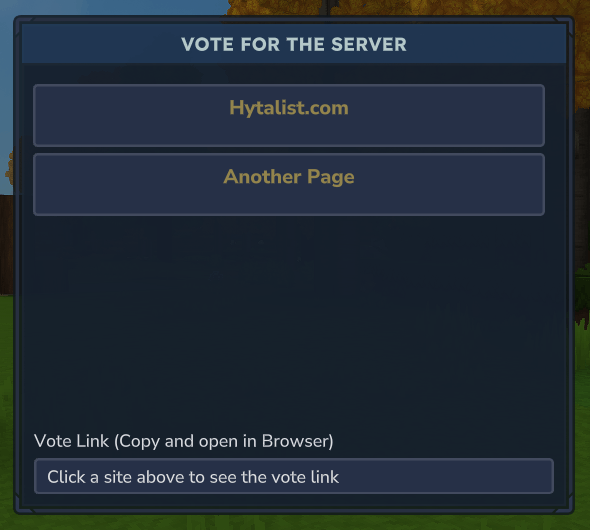
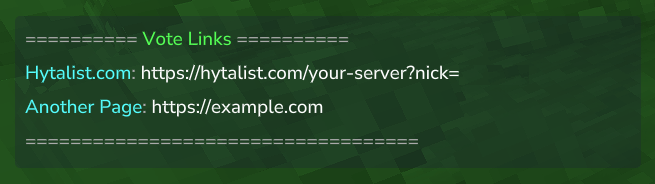
Configure the /vote command and vote site links. You can toggle UI, Chat or both.
{
  "Enabled": true,
  "VoteLinks": {
    "Hytalist.com": "https://hytalist.com/test-server?nick={player}",
    "AnotherServerList": "https://example.com"
  },
  "UI": {
    "Enabled": true,
    "Title": "Vote for the Server",
    "VoteLinkTitle": "Vote Link (Copy and open in Browser)",
    "VoteLinkDescription": "Click a site above to see the vote link"
  },
  "Chat": {
    "Enabled": true,
    "Header": "<gray>========== <green>Vote Links</green> ==========</gray>",
    "Format": "<aqua>{siteName}</aqua><gray>:</gray> <white><click:{siteUrl}>{siteUrl}</click></white>",
    "Footer": "<gray>===================================</gray>"
  }
}
#### Options
- Enabled - Enable/disable the /vote command entirely (true/false)
- VoteLinks - Map of site names to vote URLs (object)
#### UI Options
- Enabled - Show the vote GUI (true/false)
- Title - Title displayed at the top of the GUI (string)
- VoteLinkTitle - Label above the URL text field (string)
- VoteLinkDescription - Placeholder text in URL field before selection (string)
#### Chat Options
- Enabled - Send vote links to chat (true/false)
- Header - Message shown before the links, supports colors (string)
- Format - Format for each link using
{siteName}and{siteUrl}placeholders (string) - Footer - Message shown after the links, supports colors (string)
The {player} placeholder in URLs will be replaced with the player's username.
⏰ reminder.json

Configure vote reminders for players who haven't voted recently.
{
  "Enabled": true,
  "AfterHours": 24,
  "DelayInSeconds": 60,
  "CheckIntervalSeconds": 60,
  "Title": {
    "Enabled": true,
    "Title": "Vote Reminder",
    "Subtitle": "Use /vote to support the server!",
    "DurationSeconds": 3,
    "FadeInSeconds": 0.5,
    "FadeOutSeconds": 0.5
  },
  "Notification": {
    "Enabled": false,
    "Title": "<gold>Vote Reminder</gold>",
    "Description": "<gray>You haven't voted in a while!</gray> <aqua>Use /vote</aqua>",
    "IconItem": "Rock_Gem_Diamond"
  },
  "Chat": {
    "Enabled": false,
    "Messages": [
      "<gold>You haven't voted in a while!</gold>",
      "<gray>Support the server by voting:</gray> <aqua>/vote</aqua>"
    ]
  },
  "Sound": {
    "Enabled": true,
    "Name": "SFX_UI_Quest_Objective_Complete"
  }
}
#### Options
- Enabled - Enable/disable vote reminders (true/false)
- AfterHours - Remind players who haven't voted in X hours (integer, default: 24)
- DelayInSeconds - Wait X seconds after player joins before checking (integer, default: 60)
- CheckIntervalSeconds - How often to check for reminders (integer, default: 60)
#### Title Options (Big text on screen)
- Enabled - Show title on screen (true/false, default: true)
- Title - Main title text (string)
- Subtitle - Subtitle text below the title (string)
- DurationSeconds - How long the title stays on screen (integer)
- FadeInSeconds - Fade in duration (float)
- FadeOutSeconds - Fade out duration (float)
#### Notification Options (Small popup)
- Enabled - Show notification popup (true/false, default: false)
- Title - Notification title, supports colors (string)
- Description - Notification description, supports colors (string)
- IconItem - Item icon to display (string)
#### Chat Options
- Enabled - Send reminder messages to chat (true/false, default: false)
- Messages - Array of messages to send (array of strings)
#### Sound Options
- Enabled - Play sound with reminder (true/false, default: true)
- Name - Sound event name (string)
🎨 Color Formatting

HyVote uses TaleMessage for color formatting. Available tags:
<black>, <dark_blue>, <dark_green>, <dark_aqua>, <dark_red>, <dark_purple>, <gold>, <gray>, <dark_gray>, <blue>, <green>, <aqua>, <red>, <light_purple>, <yellow>, <white>
Example:
<green>{player}</green> <gray>voted on</gray> <gold>{service}</gold><gray>!</gray>You can even do rainbow colors! Example:
<gradient:red:yellow:green:blue:purple>Rainbow!</gradient>🌐 Setting Up Vote Sites
For Votifier V2 (Recommended)
- Get your token from
config.json(auto-generated on first run) - Configure your server list with:
- IP/Host: Your server IP
- Port: 8192 (or your configured port)
- Token: Copy from config.json
- Protocol: Votifier V2
For Votifier V1 (Legacy)
- Get your public key from
rsa/public.key(auto-generated on first run) - Configure your server list with:
- IP/Host: Your server IP
- Port: 8192 (same port as V2)
- Public Key: Copy content from public.key
- Protocol: Votifier V1
- Test the setup by enabling
DebugModeand voting
👨💻 For Developers
Installation
Add the HyVote API to your project:
Gradle (Kotlin DSL)
repositories {
    maven { url = uri("https://jitpack.io") }
}

dependencies {
    compileOnly("com.github.hytalist:hyvote-api:1.0.0")
}
Gradle (Groovy)
repositories {
    maven { url 'https://jitpack.io' }
}

dependencies {
    compileOnly 'com.github.hytalist:hyvote-api:1.0.0'
}
Maven
<repositories>
    <repository>
        <id>jitpack.io</id>
        <url>https://jitpack.io</url>
    </repository>
</repositories>

<dependencies>
    <dependency>
        <groupId>com.github.hytalist</groupId>
        <artifactId>hyvote-api</artifactId>
        <version>1.0.0</version>
        <scope>provided</scope>
    </dependency>
</dependencies>
VoteReceivedEvent
Listen to vote events from other plugins:
Java
import com.hytalist.hyvote.event.VoteReceivedEvent;
import com.hytalist.hyvote.model.Vote;

@Override
public void setup() {
    eventRegistry.registerGlobal(VoteReceivedEvent.class, event -> {
        Vote vote = event.getVote();
        String player = vote.getUsername();
        String service = vote.getServiceName();

        // Cancel default rewards
        event.setCancelled(true);

        // Handle with custom logic
    });
}
Kotlin
import com.hytalist.hyvote.event.VoteReceivedEvent

override fun setup() {
    eventRegistry.registerGlobal(VoteReceivedEvent::class.java) { event ->
        val vote = event.vote
        val player = vote.username
        val service = vote.serviceName

        // Cancel default rewards
        event.setCancelled(true)

        // Handle with custom logic
    }
}
🔧 Troubleshooting
Votes not being received
- ✅ Enable
DebugModein config.json - ✅ Check firewall - ensure Votifier port is open
- ✅ Verify token matches between config and vote site
- ✅ Check server logs for
HyVotemessages
Common Issues
- "Invalid signature" (V2) - Token mismatch, check token on vote site
- "Failed to decrypt" (V1) - Public key mismatch, copy full content from rsa/public.key
- "No response" - Check firewall/port configuration
🏗️ Building from Source
./gradlew clean buildOutput: build/libs/HyVote-x.x.x.jar
📋 Requirements
- Hytale Server
- Java 21+
📜 License
MIT License - see LICENSE file.
🙏 Credits
- Protocol based on NuVotifier specification
- Color formatting powered by TaleMessage
Made with ❤️ for the Hytale community
0 Comments