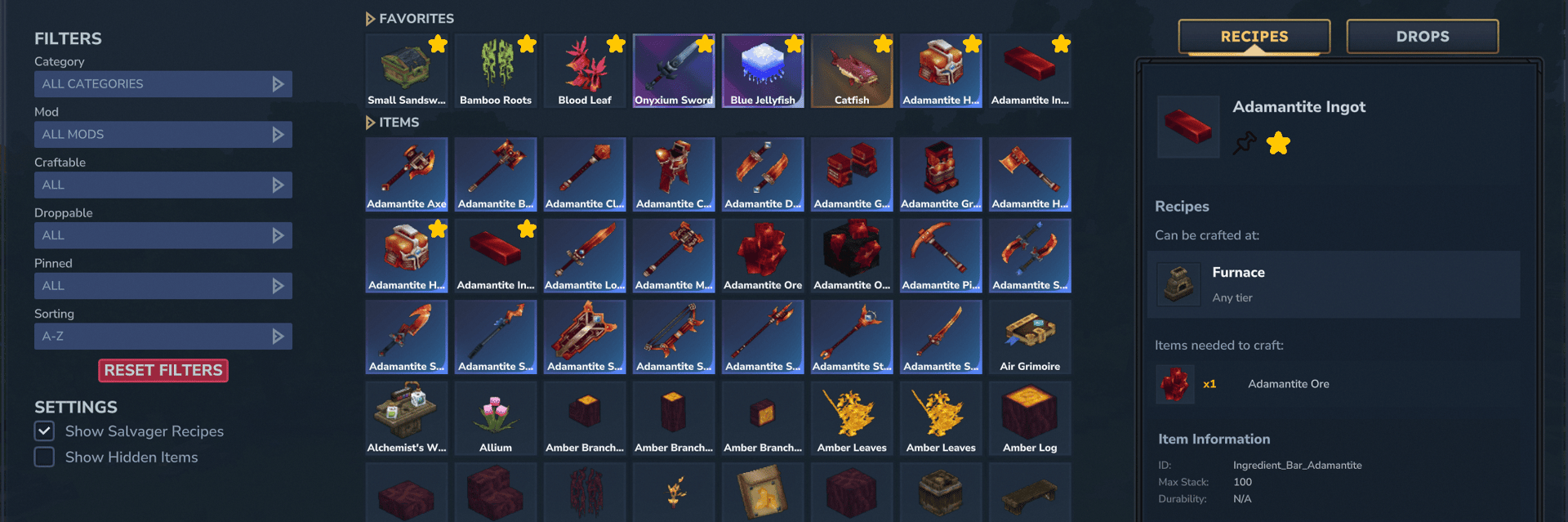
Hytems is a lightweight and modern in-game browser that helps you discover items, recipes, drops, mobs, and crafting requirements directly inside Hytale.
No more guessing which items exist, where they come from, or what you need to craft them. Open Hytems, search what you need, pin important items to your HUD, and keep progressing without leaving the game.
✨ Features
🔍 Complete Item Browser - Browse all available Hytale items directly in-game, including supported custom items from other mods. Use the filter sidebar to narrow the grid by category, mod, craftability, drop availability, pinned status, or sorting mode.
📜 Recipe Viewer - View crafting recipes, required ingredients, crafting stations, drops, and other useful item information in one clean interface. Optional salvager recipes show the salvage bench and every item that can be salvaged to obtain the selected item.
📖 Item Lexicon - Allows you to open all Hytems menus in survival using a craftable book! You can craft it in the Tier 2 Workbench under the Survival category and requires 5x Medium Leather, 10x Plant Fiber, 10x Linen Scraps.
🧟 Mob Browser & Drop Support - Discover which mobs can drop specific items and explore detailed mob information directly inside Hytems.
Open the mob browser with:
/h mobs or /hytems mobs
The Mob Overview UI displays available mob information in three clear sections:
Attributes Shows useful mob stats such as health, family, and other available attributes.
Drops & Variants Lists known drops and possible equipment variants, including tools, armor, and weapons the mob may spawn with.
Spawn & Habitat Shows known spawn locations in the world, structured as Zone -> Biome -> Structure
🔎 Real-time Search - Quickly find items by name, category, or type using the built-in real-time search.
🏷️ Category Search - Use @category prefixes to narrow down your search. All native categories and subcategories shown in the category dropdown are supported. Valid category tags are highlighted in green.
Example:
@Blocks.Cloth
This will show all items in the Blocks.Cloth subcategory. Subcategories can also be searched using their short form, such as@Cloth. Main categories such as@Blocksinclude all of their subcategories. You can also add item text after a tag, for example:
@Blocks wood
🧩 Mod Search - Use #mod prefixes to search within items added by a specific asset pack. Valid mod tags are highlighted in light blue.Example:
#Hytems sword
🎛️ Filters & Settings - Refine the item browser with flexible filters, sorting options, and optional visibility settings:
- Category, mod, craftable, droppable, and pinned filters
- Sorting by name, quality, weapon damage, or category
- Setting to show salvager recipes
- Setting to show hidden and developer items
📌 HUD pinning - Pin up to 3 items directly to your HUD and track their required ingredients while playing.
Hytems also checks your inventory and updates the remaining required items live whenever your inventory changes.
You can manage pinned items with:
/h pins or /hytems pins
⭐ Favorite Items - Mark up to 8 items as favorites and access them instantly at the top of the item browser.
🕐 Recent Item History - Recently searched or viewed items are saved for quick access.
📊 Detailed Item Information - View useful details such as item IDs, stack sizes, durability, crafting requirements, and more.
🎨 Clean Dark UI - A modern dark-themed interface designed to fit naturally into Hytale’s style.
🔧 Mod Support - Hytems supports custom items and mobs from other mods, making it useful for both vanilla and modded gameplay.
⚡ Lightweight - Built with performance in mind, Hytems keeps the interface smooth without unnecessary overhead.
📦 Requirements
<span style="color:#2dc26b"><strong>For the main release <em>hytems-1.7.1 or higher</em> and the beta release <em>hytems-1.7.0-hytale-pre5.9</em> or higher, Hytems uses Hytale's native keyed custom HUD layers. MultipleHUD is no longer required for these versions.</strong></span>
<span style="color:#e03e2d"><strong>For Hytems from <em>v1.1.0</em> to <em>v1.7.0</em>, and for beta releases <em>hytems-1.7.0-hytale-pre5.7</em> and <em>hytems-1.7.0-hytale-pre5.8</em>, you still need to install <a style="color:#e03e2d" href="https://www.curseforge.com/hytale/mods/multiplehud" rel="nofollow">MultipleHUD</a> (<em>1.0.7 or higher</em>) for the mod to work properly.</strong></span>
📖 How to use
- Simply type
/hytemsor/hin chat ore use the Item Lexicon to open the browser! - Leftclick any item to view its details and recipe
- Rightclick any item to see where it can be dropped
- Use the sidebar to filter and sort the item grid
- Use the search bar to find items,
@categories, or#mods - Enable salvager recipes or hidden items in the settings section when needed
- Navigate through the pages with
<and>buttons
💝 Special Thanks
Special thanks go out to <span style="color:#236fa1"><a style="color:#236fa1" href="https://www.curseforge.com/members/jxstjordan/projects" target="_blank" rel="nofollow">@jxstjordan</a></span> for creating the Item Lexicon model, textures and animations for Hytems. Thank you for your amazing work and support!
🪩 The Future
With the release of 1.9.0, Hytems is now feature complete! In the future I will focus on compatibility updates and bug fixes for each new Hytale version releasing. If you still have any ideas what I could add to Hytems let me know. Maybe we could make another new feature update work in the future!
I hope you enjoy this really useful mod! It's my first project.
__Disclaimer:__ I inspired myself from other mods and projects. I'm happy about feedback and feature ideas. For issues and suggestions, please join my Discord or go to GitHub!
If you are looking for older version of Hytems, please check out CurseForge!
0 Comments